
Is There a Duolingo for Thai? Phuut's 8 Game Modes (2026)
Affiliate disclosure: This article contains affiliate links. We may earn a small commission at no extra cost to you. As an Amazon Associate, we earn from qualifying purchases.

About the reviewer

Taishi Hirano
Phuut Founder
Founder of Phuut. Has observed how Japanese and English speakers stumble on Thai and built learning products around those patterns.
Follow Phuut on X →You open Duolingo, search for Thai, and get nothing. There is no Thai on Duolingo. Not a beta, not a preview, and not a course in development. That absence is permanent. So is there a Duolingo for Thai? The short answer is no. The useful answer is this: Phuut has 8 game modes built specifically for Thai, and they map directly to the habit loop Duolingo users already know. This article lays out that mapping, mode by mode, so you can start today.
- Why there is no Thai on Duolingo
- What makes Duolingo work, and what Thai needs on top
- Phuut’s 8 game modes: the Duolingo loop for Thai
- How to start: the first 7 days
Why There Is No Thai on Duolingo
If you searched for “Duolingo Thai” expecting a release date, this section is not good news. Thai is not delayed on Duolingo. It was never on track.
Duolingo builds non-flagship language courses through a program called the Incubator. Volunteer contributor teams assemble around a language, build the course content, and must pass internal quality gates before the course graduates to public release. That program produced Welsh, Navajo, and Swahili, among others.
A Thai course was submitted to the Incubator. It did not graduate. The Incubator was wound down between 2021 and 2022, taking the Thai course with it. That program is gone. There is no successor track.
Duolingo’s current expansion priorities are public. The company focuses on high-population-market languages where the return justifies the investment: European languages, Hindi, Arabic, Korean. Thai is a Category IV language on the FSI difficulty scale, meaning it’s among the hardest for English speakers to acquire. Its global learner market is smaller than the languages Duolingo targets. The economics don’t favor Thai.
Thai is not on Duolingo’s public roadmap as of June 2026. Think of it this way: the bus route was cancelled, not delayed. Waiting at the stop won’t help.
That said, the reason you wanted Duolingo for Thai is worth examining. Duolingo’s reputation isn’t built on content quality. It’s built on mechanics: short daily sessions, varied games, immediate feedback, a streak that keeps you coming back. If you want that experience applied to Thai, the right question isn’t “when will Duolingo add Thai?” It’s “which app replicates that loop for Thai specifically?”
That question has a concrete answer. But first, it helps to understand exactly what the loop is and where it would break down even if Duolingo had built a Thai course.
What Makes Duolingo Effective (and What Thai Requires on Top)
Duolingo’s retention is not a mystery. It’s a feedback loop applied consistently across all the languages it supports.
The loop works like this. You see a word or prompt (stimulus). You tap, speak, or type your answer (attempt). The app tells you immediately whether you were right (signal). It re-exposes you to anything you got wrong in the same session and in future sessions (re-exposure). Four steps. Tight timing. Repeat daily.
What makes it powerful is not any single step. It’s how fast the loop closes. The gap between attempt and signal is under a second. You never sit with uncertainty. You know immediately, and the error goes into a review queue. That’s why it builds habits: every session feels complete, not interrupted.
This is what people mean when they say “I want Duolingo for Thai.” They want the feedback loop, not Duolingo’s owl specifically.
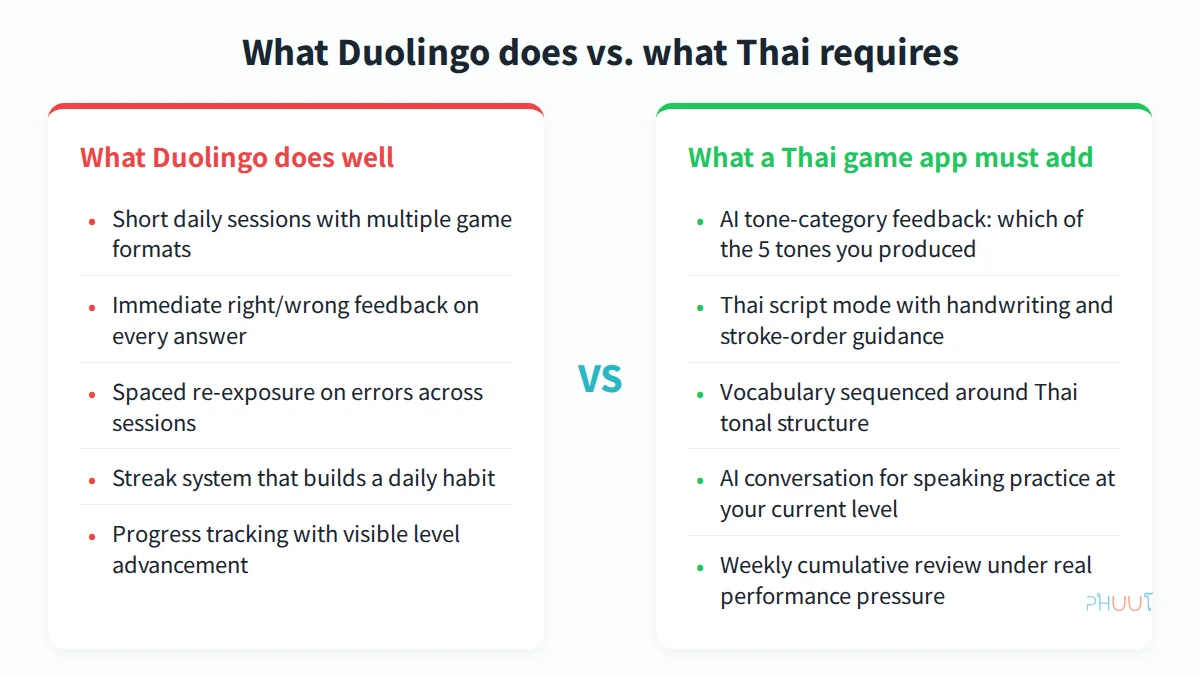
Here’s the problem: even if Duolingo had finished a Thai course, it would have hit a structural wall. Thai has 5 tones that learners must distinguish and produce accurately. The same syllable, “maa,” means come, dog, or horse depending on the tone. Duolingo’s speech recognition was designed for European languages, where phonemic differences are consonant- and vowel-level. It can tell you “recognized” or “not recognized.” It cannot tell you which of the 5 tones you produced, or which one you were supposed to produce.
That gap matters. If you practice your pronunciation and the only feedback you receive is pass or fail, you can’t correct what you don’t understand. You know something was wrong. You don’t know what to change.
A Thai game app needs two things that Duolingo’s format structurally cannot provide:
- Tone-category feedback: not pass/fail, but “you produced a falling tone; the target is mid.” That specificity makes correction possible.
- A dedicated script mode: Thai script has 44 consonants, vowel signs, and tone marks. Handling it with transliteration gets you through early vocabulary - but leaves you unable to read anything in the real world.
Phuut’s 8 Game Modes: The Duolingo Loop for Thai
Phuut was built specifically for Thai. Its game structure maps directly to the Duolingo habit loop and adds the two pieces that Thai requires.
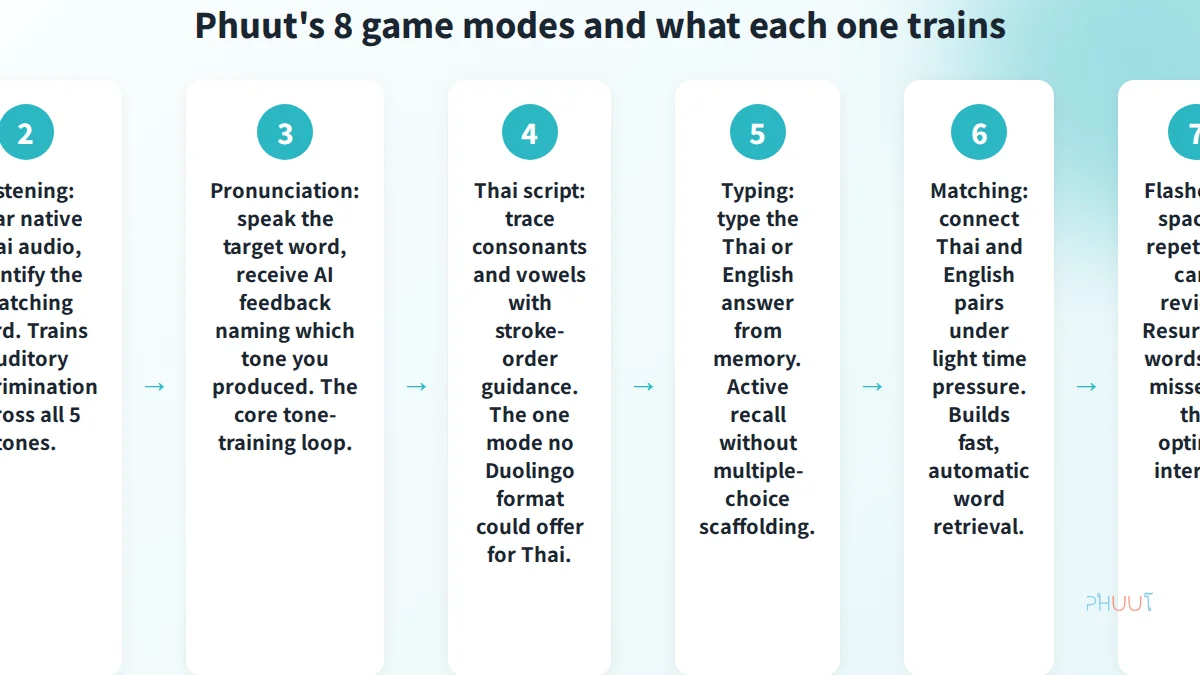
Multiple choice: You see a Thai word or phrase and pick the correct English meaning from four options. This is the direct equivalent of Duolingo’s core tap-the-answer mechanic. It trains passive vocabulary recognition. The feedback is immediate. It’s where most A1 learners spend the majority of their first sessions, and that’s the right call: you need recognition before production.
Listening mode: You hear native Thai audio and identify the matching word or phrase. This isn’t just vocabulary review. It trains your ear to distinguish between tones in context. In a tonal language, hearing the difference between similar-sounding words before you try to produce them yourself is the right sequence. The audio is recorded by native Thai speakers.
Pronunciation mode: You speak the target word and receive AI feedback naming which of the 5 tones you produced. This is the mode no Duolingo Thai course could have replicated. I built it because I kept observing the same pattern when watching learners practice: they knew a tone was wrong, but couldn’t identify why. Being told “you produced a low tone; the target is mid” changes the correction from guesswork to adjustment. That’s the actual feedback loop for tones.
Thai script mode: You trace Thai consonants and vowels with stroke-order guidance. This is the one entry in the mapping table with no Duolingo equivalent at all. If your goal includes reading signs, menus, or messages in Thai, this is where that skill begins. For a closer look at getting started with Thai script, there’s a dedicated guide on this site.
Typing mode: You type the answer from memory, in Thai or English depending on the exercise. Multiple choice is gone. You can’t narrow it down from four options. This mode tests active recall and forces a deeper level of encoding than recognition alone. Words you can type, you’ve moved out of the recognition-only stage.
Matching mode: You connect Thai and English pairs under light time pressure. The time element isn’t about raw speed. It’s about building automatic retrieval. When you connect a word without pausing to consciously work it out, it’s available for real conversation. Matching is the mode that pushes words from studied to usable.
Flashcard mode: Spaced-repetition card review. Words you missed resurface at optimized intervals across future sessions. This is the same principle as Anki, built into the app so you don’t need a separate tool running alongside your game sessions.
Boss Battle: This is the mode most worth understanding if you’re coming from Duolingo. At the end of each week, Boss Battle runs a cumulative review of every word introduced that week. All of them, in one session, under score pressure. The closest Duolingo analog is its weekly league structure, where your performance is ranked against other learners. Boss Battle is a solo pressure test, not a competition. The errors you make here feed the next week’s review queue. It simulates the condition where tones are most likely to fail: fast recall of multiple words without time to consciously work through each tone before responding. I built Boss Battle after watching learners who could produce each word correctly in isolation consistently drop tone accuracy when words came at speed - the condition that matches real conversation.
All 8 game modes are available on the free tier. Daily heart limits cap how long you can go in a single session, but every mode is accessible from day one. Pro at $4.99/month removes those limits and unlocks unlimited AI conversation turns. You don’t need to commit to anything to try every mode.

Learn Thai that actually leaves your mouth
Free on iOS & Android
Memorizing phrase lists doesn't help when you freeze at a food stall. Phuut runs lessons through real scenes — ordering, taxis, shopping — so the words come out when you need them.
- Scene-based lessons: street food, shopping, taxis, sightseeing
- AI role-play so you stop sounding like a phrasebook
- Native audio + Paiboon transliteration locks pronunciation in
- 5-minute sessions — preview just the scene you need today
How to Start: The First 7 Days
You don’t need a structured plan for day one. You need a first session.
Day 1: Install the free app on iOS or Android. Choose A1 Tourist (Phuut’s entry level, covering survival phrases) as your starting level. Run 5 minutes of multiple-choice and listening. The goal isn’t to learn Thai today. It’s to feel the loop: see a word, attempt, get a signal, move on.
Days 2-3: Add pronunciation mode. Your first few attempts will feel uncertain. That’s expected. Let the AI name your tones and note the gap. Don’t try to correct all 5 tones at once. Mid tone and falling tone appear most often in A1 Tourist vocabulary. Start there.
Days 4-6: Add matching and typing to your rotation. The variety matters. Different modes encode the same words through different cognitive processes: multiple choice is recognition, typing is recall, matching is retrieval speed. You need all three to move words into usable vocabulary.
Day 7: Boss Battle. Whatever score you get on the first one, pay attention to which words you missed. Those are the words that haven’t crossed from short-term to long-term memory yet. They’ll come back next week. That’s the queue working correctly.
When to consider Pro: if you hit the daily heart limit before you feel ready to stop, that’s the signal. The limit exists as a freemium boundary, not a learning gate. Pro removes it.
If you want to compare Phuut against other apps before committing, the site has two relevant resources: one that covers how to compare Phuut against Ling, ThaiPod101, and uTalk on tone training and gamification, and one that covers how to see how Phuut compares to Talkpal and Pimsleur on price, gamification, and script. Both are worth reading before making a decision if you want the full picture.
Learn Thai that actually leaves your mouth
Free on iOS & Android
Memorizing phrase lists doesn't help when you freeze at a food stall. Phuut runs lessons through real scenes — ordering, taxis, shopping — so the words come out when you need them.
- Scene-based lessons: street food, shopping, taxis, sightseeing
- AI role-play so you stop sounding like a phrasebook
- Native audio + Paiboon transliteration locks pronunciation in
- 5-minute sessions — preview just the scene you need today
Learn Thai that actually leaves your mouth
Free on iOS & Android
Memorizing phrase lists doesn't help when you freeze at a food stall. Phuut runs lessons through real scenes — ordering, taxis, shopping — so the words come out when you need them.
- Scene-based lessons: street food, shopping, taxis, sightseeing
- AI role-play so you stop sounding like a phrasebook
- Native audio + Paiboon transliteration locks pronunciation in
- 5-minute sessions — preview just the scene you need today