
AI Thai Tutor Apps 2026: Which Actually Improve Speaking?
Affiliate disclosure: This article contains affiliate links. We may earn a small commission at no extra cost to you. As an Amazon Associate, we earn from qualifying purchases.
About the reviewer

Taishi Hirano
Phuut Founder | Bangkok-based
Bangkok-based for 7 years. Founder of Phuut. Has observed how Japanese and English speakers stumble on Thai and built learning products around those patterns.
Follow Phuut on X →Not all AI Thai tutors are the same. In testing AI Thai apps across multiple sessions, the most consistent finding was this: the ones that felt productive weren’t always the ones that produced improvement — and the gap usually came down to whether the app could hear your tones. Thai has 5 tones that completely change word meaning — “maa” means something different depending on whether you use a mid, rising, or falling tone. Generic speech recognition checks fluency; it does not detect which tone you produced. An AI that can’t identify your tone error can’t correct it. Talkpal, Talkio AI, StudyThai.ai, and MyThaiAI all offer AI Thai conversation practice. This article compares all five — including Phuut — on the criteria that determine whether you actually improve.
In this article:
- Why most AI chat apps don’t improve your speaking
- Five AI Thai tutors — honest side-by-side
- How AI-backed speaking practice actually works in Phuut
- Which AI Thai tutor is right for you
- FAQ
Why Most AI Thai Chat Apps Don’t Improve Your Speaking
Picture this: you’ve been using an AI conversation app for three weeks. Every session feels productive — the AI responds to what you say, the exchanges flow, you finish each session feeling like you’ve practiced. Then you try to order food at a market stall in Bangkok, and the vendor looks at you with polite confusion.
That gap has a name: the speaking illusion.
That’s the speaking illusion — and it explains why weeks of AI chat can leave your Thai pronunciation exactly where it started.
AI chat tools are built to keep the conversation going — that’s the structural limitation, not a failure of effort on the learner’s part. But language improvement requires something different: a specific feedback loop that most chat tools don’t deliver.
Here’s what the feedback loop actually looks like:
- Your error is detected
- You are told what the specific error was
- The correct form is re-exposed in context, so it can be retained
Most AI language tools handle step 1 — they know you said something. Far fewer handle step 2 — identifying the specific error type. Almost none handle step 3 for tonal errors — because most speech models weren’t built with Thai tones in mind.
This is where Thai learning diverges from European language learning. With Spanish or French, grammar errors are the primary correction target. AI tools are reasonably good at catching grammar mistakes. But Thai adds a completely separate error dimension: tone. You can produce every syllable correctly and still be entirely misunderstood if the tone is wrong.
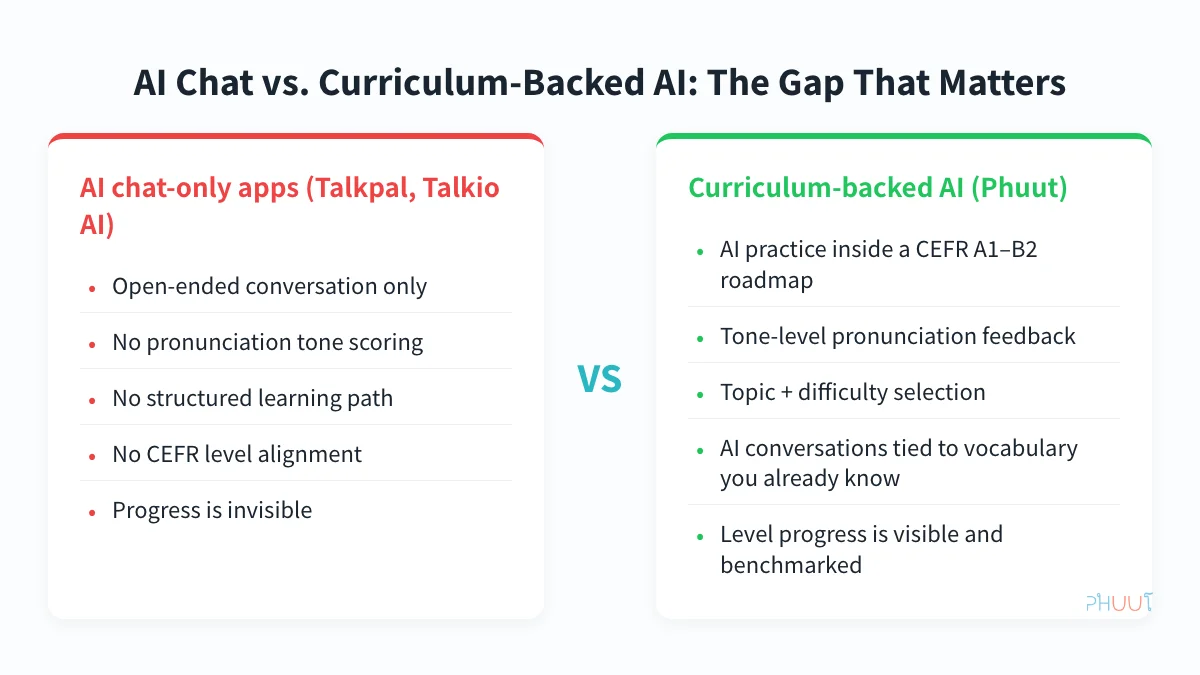
Generic speech recognition models — the kind originally built for English, Spanish, or Mandarin — do not reliably distinguish Thai tones. They can detect whether you said a Thai word. They cannot tell you whether you produced a high tone instead of a falling one on a specific syllable. That distinction is the difference between “the AI thinks you’re doing fine” and “the AI knows you mispronounced that word and can tell you exactly why.”
This is why the evaluation criteria for an AI Thai tutor should be Thai-specific, not borrowed from the generic AI language app category. If you’re searching specifically for a Thai pronunciation feedback app, the answer turns on one distinction: whether the app identifies which tone you produced, or only checks if you said a recognizable Thai word. The five apps in this comparison — Phuut, Talkpal, Talkio AI, StudyThai.ai, and MyThaiAI — will be assessed on three filters:
- Tone-specific pronunciation feedback: does it detect which tone you produced, or just whether you said a Thai word?
- Structured curriculum anchor: is AI conversation tied to vocabulary you’ve already learned, or is it open-ended chat?
- Progress visibility: can you see where you are and what’s next, or does the app just add up conversation minutes?
By the end of this comparison, you’ll have a clear answer for each app.
Five AI Thai Tutors — Honest Side-by-Side
Each app gets the same treatment: a one-line summary, what it does well, where it falls short, and who it’s best for. The structure is parallel by design — it makes the gaps obvious.
Phuut
Summary: The only app in this comparison that combines AI conversation practice with a structured CEFR A1–B2 curriculum and tone-specific pronunciation feedback.
What it does well:
- AI Talk lets you choose a topic (casual conversation, ordering food, directions, formal business) and a difficulty level before you start. You’re not dropped into open-ended chat — you set the context.
- Pronunciation feedback is tone-specific. When you mispronounce a tonal word, the AI flags which tone was produced and what the correct tone is. That’s a diagnostic, not a pass/fail check.
- AI conversations use vocabulary from the lessons you’ve already completed. An A1 learner practicing food ordering will encounter words from the A1 food lesson cluster — not advanced vocabulary that hasn’t been introduced yet.
- The Boss Battle weekly review mechanic consolidates what you’ve studied. Retention is built into the system, not left to the learner to manage.
- At $4.99/month Pro, it’s the lowest-priced structured AI Thai practice in the market.
Where it falls short:
- iOS only at time of writing. Android is in development, but if you’re on Android, this option isn’t available yet.
- AI Talk is a Pro feature — free tier users get limited AI conversation turns. “Free to start” is accurate; unlimited AI practice requires the paid plan.
- The content library, while covering 3,850 words across A1–B2, is smaller than multi-year archives like ThaiPod101.
Best for: Learners who want AI speaking practice embedded in a structured course, with visible progress toward a CEFR level.
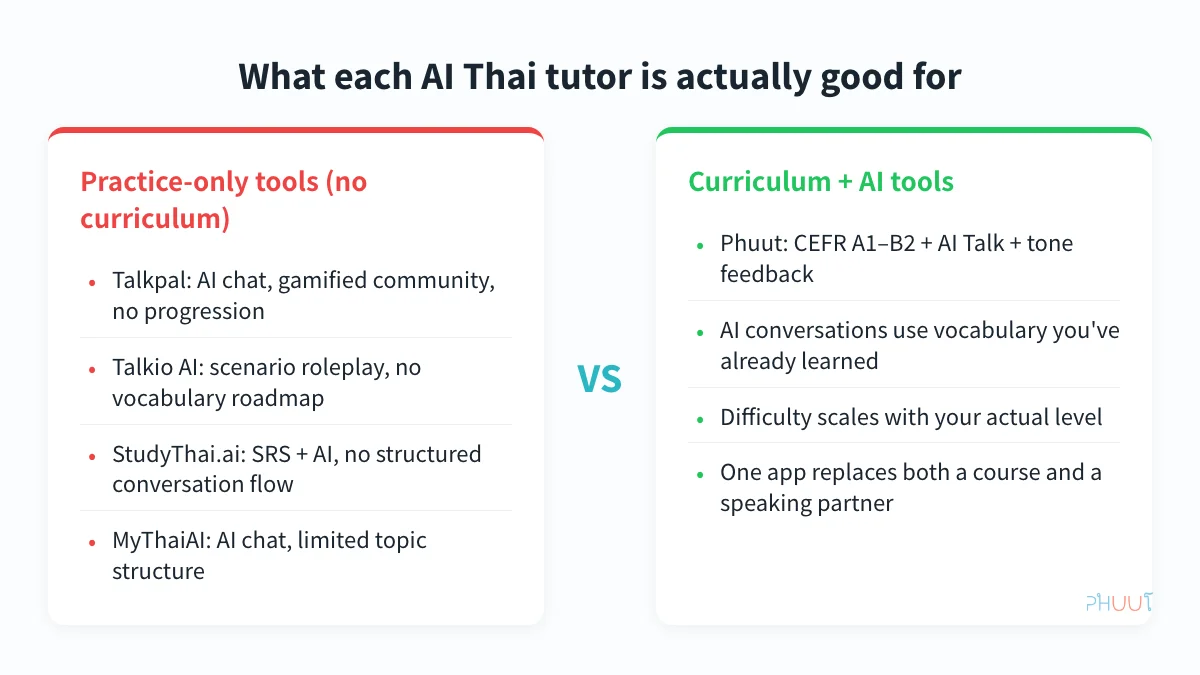
Talkpal
Summary: AI conversation app that, according to our May 2026 research, added Thai as part of a 10-language expansion; strong for unstructured conversation volume, limited on structured progression.
What it does well:
- Responsive AI chatbot with a broad topic library. You can practice a range of conversational scenarios without running out of material.
- Gamified community elements — leaderboards, streaks — add social accountability that solo study tools lack.
- Active product development: adding 10 languages in 2026 (per our May 2026 research) signals that the team is investing in the platform — though verify current language availability before subscribing.
Where it falls short:
- No CEFR curriculum. Topic clusters exist, but there’s no vocabulary progression system — you’re not building on a foundation, you’re just generating conversation.
- Speech recognition is fluency-level, not tone-specific. It checks whether you said recognizable Thai words; it does not identify tone errors.
- Pricing is not publicly listed at time of writing. The comparison table uses an estimate (~$9–15/month) based on comparable AI language apps — verify before committing.
Best for: Intermediate learners (A2+) who already have a vocabulary foundation and want to add conversation volume on top of a structured curriculum.
Talkio AI
Summary: Scenario-based roleplay AI; strong for situational immersion, no structured progression.
What it does well:
- Scenario-based conversations — ordering food, asking for directions, business meetings — map to real-world situations. The specificity is more useful than open-ended chat for travelers.
- Natural conversation flow with responsive AI. Each session starts from a chosen scenario — food ordering, asking for directions, or a business meeting — so the conversation has a defined purpose before you speak a single word.
Where it falls short:
- No vocabulary curriculum or progression system.
- Speech feedback is generic, not tone-specific.
- No spaced repetition for vocabulary retention.
- Thai-specific content library is smaller than Talkpal’s.
- Pricing is estimated at ~$9–14/month — confirm before subscribing.
Best for: Intermediate-to-advanced learners who want to practice specific real-world scenarios rather than follow a learning path.
StudyThai.ai
Summary: Emerging AI + spaced repetition app; technically focused on phonetics, no conversation system.
What it does well:
- SRS-based vocabulary review with AI quiz modes.
- Technically focused on phonetics and pronunciation drilling.
- Freemium model makes it accessible without a credit card.
- English-native interface, well-suited for English-speaking learners.
Where it falls short:
- AI interaction is quiz-format only — not conversational. If you want to practice speaking sentences, this isn’t the tool.
- No AI roleplay or free-form conversation practice.
- No CEFR roadmap or structured progression.
Best for: Learners who want AI-assisted vocabulary and phonetics drilling, not conversation practice. Works well as a supplement alongside a conversation-focused app.
MyThaiAI
Summary: AI chat tool with Thai focus; useful for informal text-based practice, very limited structure.
What it does well:
- Thai-focused AI chatbot interface. Useful for informal, low-stakes text-based conversation practice.
- Freemium access — low barrier to try.
Where it falls short:
- No pronunciation scoring of any kind.
- No curriculum or vocabulary progression.
- Conversation topics are unstructured.
- Limited product development signals in 2026 research — unclear if the app is actively maintained.
Best for: Learners who want low-commitment text-based Thai conversation practice with no paywall.
If the comparison table above has narrowed your options, the next step is understanding how the highest-rated tool actually runs a session. The mechanics behind Phuut’s AI practice are what separate it from every other app on that list — and they’re worth walking through before you commit to a plan.
How AI-Backed Speaking Practice Actually Works in Phuut
The most important design decision in Phuut’s AI Talk feature isn’t the AI itself — it’s the curriculum anchor.
Most AI chat tools give you a blank conversational slate. You can say anything, use any vocabulary, go in any direction. For an intermediate or advanced learner, that’s fine. For a beginner, it’s cognitively overwhelming. You end up producing errors faster than any system can correct them, and the session generates confusion rather than progress.
Phuut’s approach is different. AI Talk conversations are seeded from the vocabulary inventory the learner has already been taught at their current CEFR level. If you’re at A1 and you choose the “food ordering” topic, the AI conversation will center on words from the A1 food lesson cluster — the vocabulary you’ve already studied, not random advanced Thai you’ve never seen. The AI can still improvise and extend the conversation naturally, but the core vocabulary is anchored to what you know.
This is why practicing AI conversation at A1 in Phuut produces different results than practicing AI conversation at A1 in a chat-only tool. In Phuut, you’re applying and reinforcing known vocabulary in spoken context. In an open-ended chat tool, you’re encountering unknown vocabulary in an uncontrolled environment — which mostly produces anxiety and guessing, not retention.
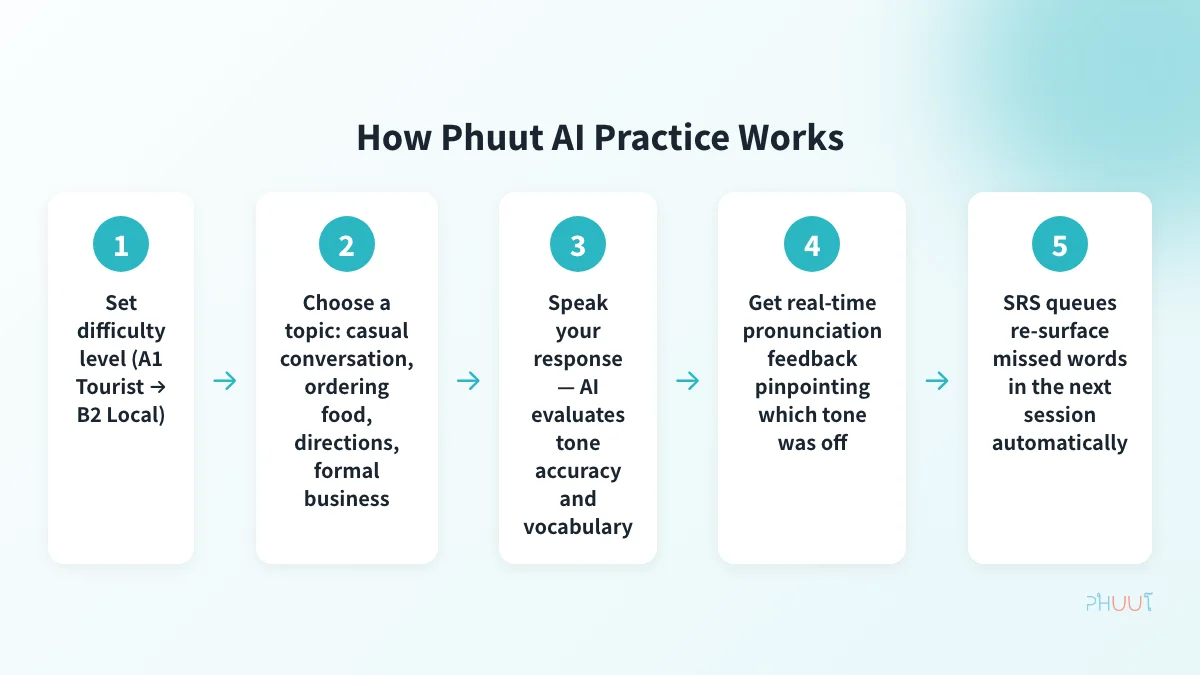
Here’s how a typical session works in Phuut:
- Open AI Talk and select your level — you confirm your current CEFR level (A1, A2, B1, or B2). The system uses this to determine which vocabulary pool to draw from.
- Choose a topic and difficulty — topics include casual conversation, ordering food, asking for directions, and formal business. Difficulty scales how much the AI will improvise beyond the core vocabulary set.
- Speak your response — the AI prompts you in Thai; you respond aloud. The session continues as a conversation, not a drill. When I tested the food ordering topic at A1 difficulty, every vocabulary item in the AI’s prompts came from the lesson cluster I’d already completed — no random B2 words appearing mid-exchange.
- Receive tone-specific feedback — when you mispronounce a tonal word, the AI doesn’t just flag it as wrong. It identifies which of the 5 tones you produced and states which tone is correct: “you said a high tone; the correct tone is falling” — a diagnostic, not a pass/fail check.
- Watch missed words re-enter your review queue — vocabulary you struggled with during the AI Talk session automatically feeds back into your SRS (spaced repetition) review. The conversation and the study system are connected; nothing is siloed.
That feedback loop in step 4 — tone identified, not just flagged — is what makes the diagnostic actionable. “That was incorrect” gives you nothing to work with; knowing you defaulted to a high tone when the word requires a falling one gives you a specific target for the next repetition.
If you want to train your tone ear before attempting AI conversation, game-based tone practice is an effective way to build tone recognition in a lower-stakes format first.
Which AI Thai Tutor Is Right for You
You’ve seen the comparison. Here’s how to translate it into a choice.
Path A — Complete beginner (A1)
Start with Phuut. Build your A1 vocabulary and pronunciation foundation before attempting open-ended AI conversation. Before you complete Phuut’s A1 Tourist level, you don’t have a stable vocabulary base or consistent tone patterns yet. Open-ended AI chat at this stage generates more errors than it corrects. Add Talkpal or Talkio AI at A2, once you can hold a 3–4 sentence exchange and you have enough vocabulary for the AI to work with.
Path B — Intermediate learner who wants more conversation volume (A2+)
Use Phuut as your structural anchor and Talkpal for additional unstructured practice. Phuut maintains the vocabulary and pronunciation progression; Talkpal adds conversation hours. Monthly cost: Phuut at $4.99 plus Talkpal at ~$9–15 (est.) — still well under $20/month combined. Compare that to a single session with a human Thai tutor.
Path C — Traveler or scenario-focused learner
Talkio AI for specific scenario immersion, or Phuut’s scene-based lessons if you also want vocabulary retention across the trip. If your goal is a two-week trip and you want to speak Thai in specific situations fast, work through Phuut’s A1 Tourist module. It covers greetings, numbers, food, and transport — exactly what you need, in the order you’ll use it.
The human tutor cost anchor
Human Thai tutors on Preply run $60–140 per month. Every app in this comparison costs less than a single tutoring session. The question isn’t “is AI good enough to replace a tutor?” It’s a different question: what does AI practice provide that makes the human tutor hours you might still want more efficient?
If you go into a tutoring session having already practiced ordering food in Phuut’s AI Talk, your tutor isn’t spending time on basic vocabulary introduction. You’re using that session for nuance, correction of persistent errors, and cultural context — the things AI genuinely can’t replicate at the same quality. That’s a better use of $60.
Before committing to any paid plan, test the free tier. Every app in this comparison has a free or freemium option. Apply the three-filter checklist from the first section: tone-specific feedback, curriculum anchor, progress visibility. See which one you actually open the next morning.
If you want a broader comparison that includes non-AI options like Ling, ThaiPod101, and Pimsleur, compare all Thai learning apps for a fuller picture.
FAQ

Build a Thai habit that actually sticks
Free on iOS
Willpower isn't a strategy. Phuut bakes proven learning science into the app so you just need to tap for 5 minutes a day.
- Spaced repetition (SRS) tuned to forgetting curves
- CEFR A1–B2 and Thai proficiency-test vocabulary only
- Paiboon transliteration fixes the read-but-can't-speak gap
- Free on iOS — the structure handles the discipline for you