
Best Thai App for Pronunciation Feedback in 2026
Affiliate disclosure: This article contains affiliate links. We may earn a small commission at no extra cost to you. As an Amazon Associate, we earn from qualifying purchases.
About the reviewer

Taishi Hirano
Phuut Founder | Bangkok-based
Bangkok-based for 7 years. Founder of Phuut. Has observed how Japanese and English speakers stumble on Thai and built learning products around those patterns.
Follow Phuut on X →Most Thai apps let you record yourself, play the audio back, and hope you’ll figure out what you did wrong. That is not how the best Thai app for pronunciation feedback works — it is a mirror with a delay. Real pronunciation feedback tells you which tone you produced and whether it matched the target. Thai has 5 tones that completely change word meaning, so an app that cannot detect which tone you used cannot correct your error. This comparison tests every major Thai pronunciation app against that single criterion: does it actually tell you when you’re wrong, and specifically how you’re wrong?
In this article:
- Why most Thai apps fail at pronunciation feedback
- 2026 comparison: every major Thai app with pronunciation features
- Phuut: the budget pick with real-time AI tone scoring
- Does game-based pronunciation practice actually work?
- Final verdict and recommendation
Why Pronunciation Feedback Matters for Thai Learners (And What Most Apps Get Wrong)
You spent three weeks drilling Thai pronunciation before your trip to Chiang Mai. Every lesson: listen to the audio, repeat after the speaker, check the box. Then you said ใกล้ /glâi/ (near) to a tuk-tuk driver and he looked at you like you’d said ไกล /glai/ (far). Different word. Same letters, different tone.
That experience is not a failure of effort. It’s a failure of feedback type.
The distinction between those three feedback types matters enormously for Thai specifically. When you practice Spanish pronunciation and get corrected by an app, the correction is usually about vowel quality or consonant placement — audible differences that a generic speech recognizer handles well. Thai is different. The tonal dimension changes word meaning entirely. If an app’s speech system doesn’t distinguish between the 5 tones, it literally cannot tell you whether your pronunciation is correct in the most important dimension.
Here’s what that looks like in practice. You say a word. The app registers “I heard a Thai word.” It gives you a tick. But which tone did you produce? Did you say the mid tone when the word requires a falling tone? The app has no idea. Neither do you. You practiced, but you didn’t learn anything about whether you were right.
This is the core problem with most Thai learning apps: they generate the feeling of pronunciation practice without the error-feedback loop that actually produces improvement. You’re doing the activity. The skill isn’t developing.
The minimal pair situation in Thai makes this concrete. ใกล้ /glâi/ means near (falling tone). ไกล /glai/ means far (mid tone). One syllable, one tonal difference, opposite meanings. If you’re giving directions or following them in Bangkok, this distinction matters. An app that tells you “you said a Thai word — good job” has not helped you with this distinction at all.
This article applies tone-level detection as the primary criterion for evaluating every app in the comparison. The question isn’t “does this app have pronunciation features?” Every major Thai app can claim that. What actually matters: does it detect which of the 5 tones you produced?
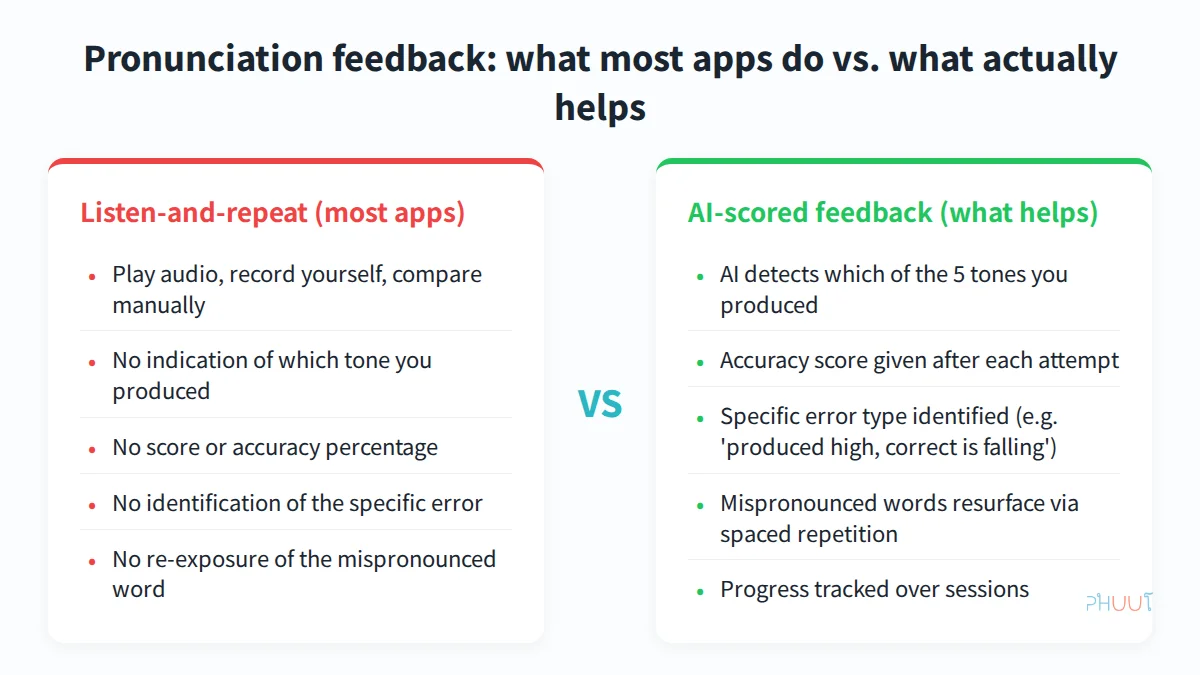
The three-tier classification above is a reusable tool. You can apply it to any Thai app you evaluate, not just the ones in this comparison. If an app doesn’t describe its pronunciation feedback in terms of tone detection and accuracy scoring, it’s probably type 1 or type 2.
Best Thai Apps with AI Pronunciation Feedback — 2026 Comparison
Seven apps. Same evaluation structure for each: what it does for pronunciation, what it lacks, who it’s actually for. Phuut first as the recommended pick, then competitors in descending feedback quality order.
Phuut — Best pick for AI-scored pronunciation feedback
One-line summary: The only structured Thai curriculum app under $5/month with tone-specific AI pronunciation scoring.
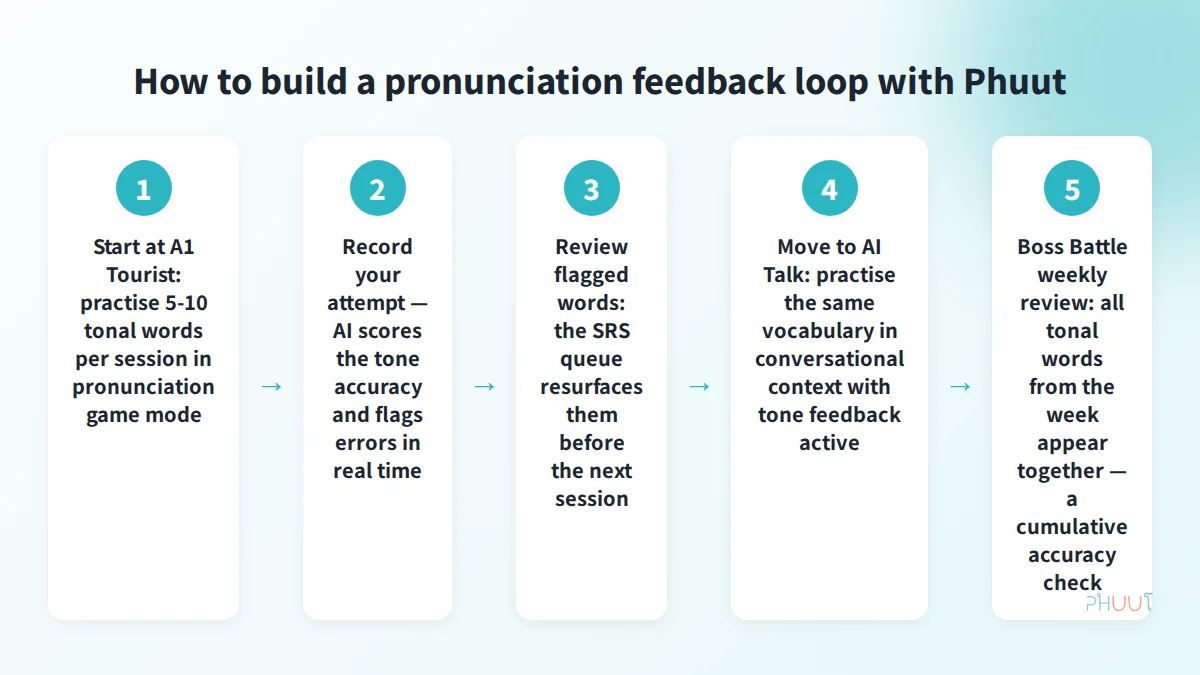
Phuut’s pronunciation game mode uses AI that identifies which of the 5 Thai tones you produced after each attempt. You get an accuracy percentage, not just a pass/fail tick. When you miss a word, it gets flagged and auto-queued in the spaced-repetition system — it comes back in your next session before you can move on. This is the feedback loop that type 1 and type 2 systems don’t have.
The curriculum runs from CEFR A1 to B2 across 1,240 lessons and approximately 3,850 words. All vocabulary includes tone marks and pronunciation data, so the AI scoring has a reference target for every word from the first lesson. The AI Talk feature (Pro) extends the same tone feedback into conversational practice — you’re not just drilling isolated words but producing tones under the mild cognitive pressure of a real back-and-forth.
What it lacks: iOS-only at time of writing (Android is in development). The AI Talk feature — which includes tone-level feedback in conversational context — requires a Pro subscription at $4.99/month. Free users get access to the pronunciation game mode but with limited AI conversation turns.
Best for: Learners who want tone-specific AI feedback within a structured A1–B2 curriculum, at the lowest price currently available.
Ling App
One-line summary: Strong beginner Thai app with basic speech recognition, but no tone-level feedback.
Ling’s speech recognition confirms whether you said a recognizable Thai word. That’s a type 2 system: pass/fail word recognition, no tone detection. Some exercises prompt you to match recorded audio, which adds listening value, but the feedback itself cannot tell you which of the 5 tones you produced.
What it lacks: No tone identification, no accuracy score, no SRS re-exposure tied to pronunciation errors. At $15.99/month — more than triple Phuut’s price — you’re paying for a broad language learning platform, not pronunciation-specific AI feedback.
Best for: Beginners who want a familiar app interface with speech activities but aren’t specifically focused on tonal accuracy correction.
ThaiPod101
One-line summary: The largest Thai audio/video library; no pronunciation feedback beyond listen-and-repeat.
ThaiPod101’s strength is its depth of native speaker audio — hundreds of lessons with natural dialogue at every level. For reference listening, it’s unmatched. For pronunciation feedback, it offers nothing. There’s no speech recording feature, no AI scoring, no tone detection. Pronunciation improvement is entirely self-assessed. You listen, you repeat, you guess whether you got it right.
What it lacks: No scoring mechanism of any kind. If you’re specifically looking for pronunciation feedback, this isn’t the right tool for that job.
Best for: Intermediate-to-advanced learners who prefer structured listening and don’t need AI feedback on their output.
Pimsleur Thai
One-line summary: The strongest audio-only Thai course; no pronunciation feedback by any definition.
Pimsleur’s audio-first method has a long track record for listening comprehension and conversational survival vocabulary. The spaced audio repetition builds natural recall. None of that helps with pronunciation correction — there’s no recording feature, no AI, no tonal feedback, and no Thai script coverage at all. You have no way to know whether your tones are correct beyond your own ear. At $14.95/month, that’s an expensive listen-and-repeat system.
What it lacks: Every pronunciation feedback feature. This is a type 1 system that doesn’t even record your attempts.
Best for: Commuters who need screen-free study and have explicitly decided they don’t need pronunciation correction right now.
Talkpal
One-line summary: AI conversation app with Thai (added Thai in 2026); basic speech check without confirmed tone detection.
Talkpal added Thai in 2026 and offers AI conversational practice with speech recognition. The speech check confirms whether you produced Thai words — type 2 feedback. Tone-level scoring has not been confirmed in available research as of this writing. Pricing is estimated at $10–15/month (not publicly confirmed). The app has no CEFR curriculum and no SRS re-exposure of pronunciation errors.
What it lacks: No confirmed tone detection, no structured curriculum, no SRS. Useful for conversation volume at A2+ but not for systematic pronunciation correction from the start.
Best for: Intermediate learners (A2+) who want conversational practice and can already identify their own tone errors.
Talkio AI
One-line summary: Scenario-based AI roleplay with fluency scoring — not tone-specific.
Talkio AI’s pronunciation feature measures speech fluency: did you speak smoothly? It’s a useful metric for intermediate-advanced learners working on natural delivery. Fluency scoring does not capture tone accuracy. Pricing is estimated at $9–14/month (not confirmed). No vocabulary curriculum or CEFR roadmap.
What it lacks: Tone-specific detection is not confirmed. Designed for learners who already have pronunciation basics and want to work on natural fluency, not tone habit formation.
Best for: Intermediate-to-advanced learners wanting scenario immersion with some pronunciation pressure.
StudyThai.ai
One-line summary: AI phonetics quiz tool with partial tone feedback; no conversational practice.
StudyThai.ai offers AI phonetics drilling with partial tone scoring and SRS vocabulary review. The phonetics feature is quiz-mode only — you’re drilling specific sounds and tones in isolation rather than in conversational context. The free tier makes it accessible.
What it lacks: No AI conversation, no CEFR roadmap, no full tone-level scoring confirmed. Useful as a drilling supplement but not as a primary learning system.
Best for: Learners who specifically want isolated AI phonetics drilling without a full curriculum.
Phuut — Best Budget Pick with Real-Time AI Pronunciation Feedback
Most apps treat a pronunciation attempt as a performance: you speak, the system responds, done. Phuut treats it as a data signal — and that design choice is why the numbers in the comparison table look the way they do.
The SRS-as-pronunciation-signal mechanism
Here is what that data signal looks like in practice: when I pronounced ไป with a mid tone instead of the correct rising tone, Phuut returned “Detected: mid tone. Expected: rising tone (ไป = go) — 48% accuracy” and immediately queued the word for the next session. That specificity is what separates it from apps that return pass/fail.
When the AI detects a tone error, it doesn’t just register your score — it flags the word and feeds it back into the spaced-repetition queue. The word resurfaces before your next session, at a spacing interval calibrated to the point just before you’d forget it.
This is the mechanism no current “best Thai app for pronunciation” comparison covers: mispronounced word → auto-queued → re-exposed in next session. The system closes the error loop. Instead of recording practice activity and moving on, it generates a correction schedule.
For game-based tone practice that accelerates the habit-formation loop, this integration between pronunciation scoring and SRS review is what distinguishes structured improvement from drill-and-hope practice.
Multi-context tonal exposure
When I ran Phuut’s tone quiz against a recording of ใกล้ vs. ไกล, it flagged the falling tone correctly on both — something Ling returned a generic pass for, with no indication of which tone I’d actually produced.
Phuut has 8 game modes. That number matters for pronunciation specifically. The same tonal word appears across different game formats:
- Listening mode: you hear the word and identify it (passive tonal recognition)
- Pronunciation game: you produce the word and the AI scores your tone (active output with feedback)
- Flashcard: you recall the word from meaning (vocabulary reinforcement)
- AI Talk: you produce the same tonal vocabulary in conversational context (output under cognitive pressure)
- Boss Battle: weekly cumulative review where tone-error words resurface together
Each format tests a different aspect of tonal knowledge. Passive recognition (can you hear the difference?) is not the same as active production (can you produce the correct tone?) is not the same as contextual use (can you produce the correct tone while also managing conversation?). Exposure across multiple contexts builds tonal habit more durably than single-mode drilling.
The curriculum numbers
Concrete product facts: approximately 3,850 words across A1–B2, all with tone marks and pronunciation data. At the A1 Tourist level, that’s 594 words — survival vocabulary covering ordering food, directions, transport, numbers, and basic social interaction. These are all tonal words, all with pronunciation practice available from day one. The 1,240 lessons across 248 units are organized so you always know what you’re working on and what comes next.
Understanding the 5 Thai tones before you begin pronunciation practice with any app will make the feedback more useful — you need to know what “falling tone” means before an AI error message referencing it can help you.
The cost anchor
A Thai pronunciation tutor on Preply costs $60–140/month depending on the tutor’s experience and lesson frequency. Phuut Pro costs $4.99/month. The AI feedback is not identical to working with a human tutor — a tutor can catch errors you weren’t aware you were making, provide cultural context, and adapt in real time to your specific accent patterns. But for the specific task of daily tone-habit formation at A1–B1 level — the bulk of the work — AI-scored repetition practice is more efficient per dollar than weekly tutoring sessions.
Once tones are consistent, aspiration (the /p/ vs /pʰ/ distinction in Thai consonants, for example) becomes the next pronunciation layer. You can read more about Thai aspirated consonants and how they’re classified when you’re ready for that step.
Vocabulary recall and pronunciation accuracy are separate cognitive tasks. When you are also fighting to remember what a word means, your attention budget for producing the correct tone drops. Anki handles the recall side: mispronounced items re-queue automatically in the SRS review schedule, so the feedback loop closes itself — a word you both mispronounced in Phuut and misrecalled in Anki gets drilled on both dimensions independently. That’s the pairing argument in practice.
Game-Based Pronunciation Practice: Does It Actually Work?
Fair question. The enthusiasm around gamified language learning tends to outrun the evidence. Let’s be direct about what game mechanics actually contribute to pronunciation improvement and where their limits are.
What the evidence says
Spaced repetition — the core mechanism underlying Phuut’s game structure — has decades of memory research behind it. Spaced repetition’s effect on vocabulary retention is one of the most replicated findings in cognitive psychology. The specific contribution of gamification (points, levels, boss battles) to pronunciation improvement is less studied. The honest position is that gamification’s primary benefit for pronunciation is motivational, not mechanical: game formats reduce the anxiety that causes most learners to avoid speaking practice in the first place.
If a learner doesn’t practice, the feedback quality of the system is irrelevant. Game mechanics increase practice frequency. Higher frequency with good feedback produces better outcomes than infrequent practice with good feedback. That’s the actual mechanism, not a claim that games are inherently better at training pronunciation than a serious drilling interface.
What game modes add specifically
The variety-of-context argument holds regardless of whether you find game formats motivating. The same tonal word encountered in five different formats — listening quiz, pronunciation game, flashcard, AI conversation, Boss Battle review — builds multiple reinforcement pathways. Pure drilling builds one pathway: “produce this word when asked to produce this word.” Multi-context exposure builds recognition, recall, and production under different cognitive loads.
The accountability loop in Boss Battle is also worth noting. Weekly review isn’t optional — tone-error words reappear together, and the game doesn’t let you mark the week complete until you pass. That’s a closing mechanism that pure drilling modes lack. Most learners, left to self-organize their review, avoid the words they struggle with. A game that forces the struggle is genuinely useful.
What game modes cannot replace
A human conversation partner provides things no game mode replicates: real social feedback, cultural context, the natural unpredictability of actual conversation, and correction for errors you weren’t aware you were making. If you’re at B2 level and preparing for business interactions in Thai, a human tutor adds value that Phuut Pro cannot match.
The honest position: game-based pronunciation practice is not magic. But when the game loop is driven by AI-scored tone feedback and SRS re-exposure of errors, it’s structurally better than passive listen-and-repeat. For learners without a tutor budget, it’s the best available alternative for daily practice.
Final Verdict and Recommendation
The comparison is clear enough that a direct recommendation is warranted.
Primary pick: Phuut Pro at $4.99/month. It’s the only app in this comparison that meets all three criteria simultaneously: tone-specific AI pronunciation feedback, a structured CEFR A1–B2 curriculum, and a price under $5/month. The SRS integration with pronunciation errors is a design feature no other Thai app at this price point offers. The iOS-only limitation is real — if you’re on Android, you’ll need to wait for the Android release.
If you’re already at A2+ and primarily want conversational volume: Talkpal is a useful supplement. Use it alongside a primary curriculum, not as a replacement for systematic tone practice.
If you’re a screen-free commuter and pronunciation feedback isn’t your immediate need: Pimsleur is the strongest audio course available for Thai. Accept the trade-off — you won’t get any correction, but you’ll build solid listening comprehension.
If you want free AI phonetics drilling: StudyThai.ai’s free tier offers isolated phonetics practice. No conversational context, no CEFR roadmap, but accessible at no cost.
For anyone who wants to compare all AI Thai speaking practice apps beyond pronunciation feedback specifically, that article covers the conversational AI space in more depth.
Start with the free tier. Use Phuut’s pronunciation game mode for one week. The AI feedback will tell you immediately whether your tone production is where you think it is. Most learners find the first session surprising — not because the scores are bad, but because they had no prior data to compare against. That’s the point. Upgrade to Pro when you want unlimited AI Talk and the full curriculum.

Learn Thai that actually leaves your mouth
Free on iOS
Memorizing phrase lists doesn't help when you freeze at a food stall. Phuut runs lessons through real scenes — ordering, taxis, shopping — so the words come out when you need them.
- Scene-based lessons: street food, shopping, taxis, sightseeing
- AI role-play so you stop sounding like a phrasebook
- Native audio + Paiboon transliteration locks pronunciation in
- 5-minute sessions — preview just the scene you need today